
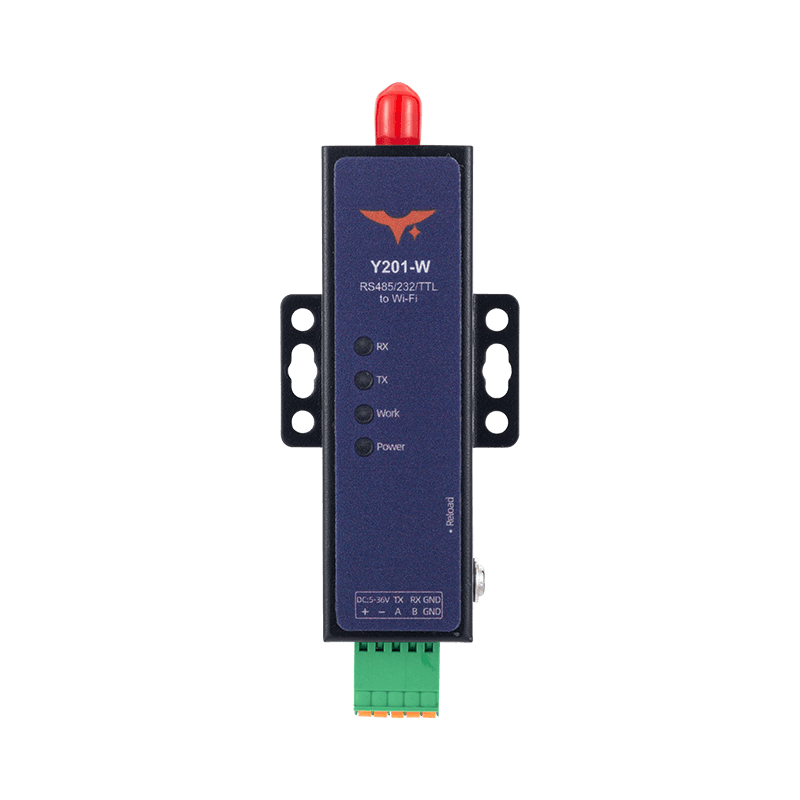
Appearance
Y201-W Technical Manual
Contents
- Overview
- Default Settings
- Quick Start
- Wi-Fi and Serial Working Mechanism
- Socket and Protocol Configuration
- Additional Functions
- AT Command Conventions and Common Commands
- Troubleshooting
1. Overview
Y201-W provides bidirectional transparent transmission between dual serial ports and Wi-Fi. Each serial port can be configured with Socket A and Socket B, supports TCP, UDP, HTTP, and MQTT, and can perform Modbus RTU to Modbus TCP conversion through the Modbus gateway.
The device supports two configuration entry points:
- Web UI, recommended for daily configuration and maintenance
- AT Commands, through serial AT or network AT
2. Default Settings
| Item | Default |
|---|---|
| Web Management IP, AP mode | 192.168.4.1 |
| Web Username | admin |
| Web Password | admin |
| Wi-Fi Mode | AP+STA |
| Serial Baud Rate | 115200 |
| Serial Format | 8 / 1 / NONE |
| Socket Enable | Only serial port 1, Socket A enabled by default |
| Registration Packet | OFF |
| Heartbeat Packet | OFF |
| LAN Discovery Port | 8168 |
| LAN Discovery Keyword | HuayunIOT |
| Reboot on No Data | 1440 min, 24 hours |
3. Quick Start
3.1 Hardware Connection
- Connect the device to the PC or field controller with the serial cable.
- Power on the device.
- If default parameters must be restored, hold the
Resetbutton for3 to 5 s.
3.2 Log In to the Web UI
- Connect to the device hotspot
HY-W202. - Open
192.168.4.1in a browser. - Log in with
admin/admin.
3.3 TCP Server Quick Verification
- On the Port 1 page, set Socket A to
TCPServerand set the port to6666. - Save and reboot the device.
- On the PC, connect a TCP client to
192.168.4.1:6666. - Open the serial port tool with
115200/8/1/NONE. - Send and receive test data to verify bidirectional transparent transmission.
4. Wi-Fi and Serial Working Mechanism
4.1 Wi-Fi Modes
| Mode | Description |
|---|---|
AP | The device provides a hotspot and terminals connect to the device |
STA | The device joins an existing router or hotspot |
AP+STA | The device provides a hotspot while joining an existing router, default |
Notes:
- AP mode does not support hotspot scanning.
- AP+STA reduces wireless performance compared with single-mode operation.
- The channel affects
2.4 GHz / 5 GHzoperation: channels1 to 13are2.4 GHz, channels36 to 165are5 GHz.
4.2 Serial Modes
Each serial port supports two modes:
- Transparent Mode, default: Serial data is forwarded to the Socket
- AT Mode: Serial data is handled as AT commands
Recommended sequence for entering AT mode:
- Send
+++ - Wait about
500 ms, less than3 s - Send
a - Enter AT mode after receiving
+ok
Exit AT mode by sending AT+EXIT or by rebooting the device.
4.3 Packetization
Transmission is triggered when either condition is met:
- Length trigger: length
>= packet length, range8 to 1460 - Interval trigger: inter-character gap
>= packet interval, range0 to 1000 ms
5. Socket and Protocol Configuration
5.1 Socket Architecture
- Each serial port supports Socket A plus Socket B.
- When both channels are enabled, serial uplink data is duplicated and sent to both Sockets.
- Downlink data from both Sockets is merged onto the same serial output.
5.2 TCP Client and TCP Server
- TCP Client: Connects automatically after the device gets an IP address and retries every
1 son failure - TCP Server: Supports up to
8concurrent clients on one port and disconnects the earliest client if the limit is exceeded
Examples:
text
AT+SOCKEN2B=ON
AT+SOCK2B=TCPC,192.168.1.16,7788
AT+REBOOT
text
AT+SOCKEN1A=ON
AT+SOCK1A=TCPS,192.168.1.16,7788
AT+REBOOT
5.3 UDP Client and UDP Server
- UDP Client: Uses a fixed target address and a fixed local port is recommended
- UDP Server: Receives data from multiple clients and sends to the most recently active one
Examples:
text
AT+SOCKEN1B=ON
AT+SOCK1B=UDPC,192.168.1.16,7788,5678
AT+REBOOT
text
AT+SOCKEN1B=ON
AT+SOCK1B=UDPS,192.168.1.16,7788
AT+REBOOT
5.4 HTTP Client
Supports GET / POST / AUTO with HTTP 1.0 / 1.1:
text
AT+SOCK1A=HTPC,www.rt-thread.com,80
AT+HTPHD1=Connection:keep-alive
AT+HTPREQ1=GET
AT+REBOOT
text
AT+SOCK1A=HTPC,www.rt-thread.com,80
AT+HTPURL1=/service/echo
AT+HTPHD1=Connection:keep-alive
AT+HTPREQ1=POST
AT+REBOOT
5.5 MQTT
MQTT works as a transparent-like mechanism. The device handles subscribe and publish actions, while the terminal side only needs to process the payload.
Core commands:
AT+MQCONFn: Connection parameters, version, clean session, keepaliveAT+MQAUTHn: Authentication, ID, username, passwordAT+MQSUBn: Subscribe enable, topic, QoSAT+MQPUBn: Publish enable, topic, QoS, retainAT+MQWILLn: Last will messageAT+MQMDn: Mode selection,STDorALI
6. Additional Functions
6.1 Heartbeat Packet
AT+HEARTMDn:OFF / UART / NETAT+HEARTTMn:1 to 86400 s, default60AT+HEARTDATn: Heartbeat content, HEX,2 to 64 bytes
Notes:
- Network heartbeat only supports TCP and UDP client modes.
- Heartbeats pause while the device is in AT mode.
6.2 Registration Packet
AT+REGTPn:MAC / CUSAT+REGMDn:OFF / FIRST / EVERY / ALLAT+REGDATn: Custom content, HEX,2 to 64 bytes
6.3 LAN Discovery and Network AT
- Broadcast the keyword
HuayunIOTto UDP port8168to discover the device. - Network AT can be sent directly within
1 minuteafter discovery.
Related commands:
AT+SEARCH=<port>,<key>AT+PING=<addr>
6.4 Firmware Upgrade
- HTTP upgrade:
AT+DOWNLOAD=host:port/path.bin, returnsOKif the download succeeds and requires manual reboot to apply - Web upgrade: upgrade from the Web system page
6.5 Exception Handling
AT+SOCKRTO=<time>sets reboot on network inactivity;0disables it- Default value is
1440, which equals24 hours
7. AT Command Conventions and Common Commands
7.1 Command Rules
- Commands start with
AT+and end with\r\n - Send one command at a time; the maximum command length is
256 bytes - Parameters are saved automatically after being set and take effect after reboot
- Wait for the response to the previous command before sending the next one
7.2 Quick Commands
| Command | Function |
|---|---|
AT+LIST | List supported commands |
AT+EXIT | Exit AT mode |
AT+REBOOT | Reboot device |
AT+RSTCFG | Restore backup parameters and reboot |
AT+MAC | Query MAC address |
AT+VER | Query firmware version |
AT+DEVINFO | Query device information |
7.3 Common Error Codes
| Error Code | Meaning |
|---|---|
ARGS | Invalid parameter |
ARGC | Wrong number of parameters |
CMD_UNKNOWN | Unknown command |
CMD_FORMAT | Invalid format |
CMD_LENGTH | Command too long |
DEV_MEMORY | Memory error |
DEV_SAVE | Save failed |
8. Troubleshooting
| Symptom | Possible Cause | Recommended Action |
|---|---|---|
| Cannot access Web UI | The subnet does not match or the device is not in AP mode | Reset the device, connect to HY-W202, and access 192.168.4.1 |
| TCP connection cannot be established | Wrong address or port, firewall blocking | Check Socket settings and open the required port |
| UDP can receive but not send | Local port not fixed or peer has not sent data | Set a fixed local port in UDP client mode and send one packet first |
| Serial communication is abnormal | Serial parameters do not match | Align baud rate, data bits, parity, and stop bits |
| Heartbeat is not sent | Mode mismatch or the device is still in AT mode | Check HEARTMDn, connection state, and exit AT mode |
| Registration packet is not reported | Registration mode is disabled | Check REGTPn, REGMDn, and REGDATn |
| Parameters are lost after reboot | Parameters were not backed up or rebooted correctly | Reboot after configuration and use BKCFG when needed |
| Frequent automatic reboot | SOCKRTO triggered | Adjust AT+SOCKRTO or disable the feature |
- Manufacturer: Hunan YenGear Tech Co., Ltd.
- Address: Room 21014, Building 1, Fudi Xingguang Tiandi, Yingxin Road, Yuhua District, Changsha, Hunan, China
- Email: hi@yengear.com
- Website: www.yengear.com