
Appearance
Y311-660-W/R Remote I/O Module Datasheet
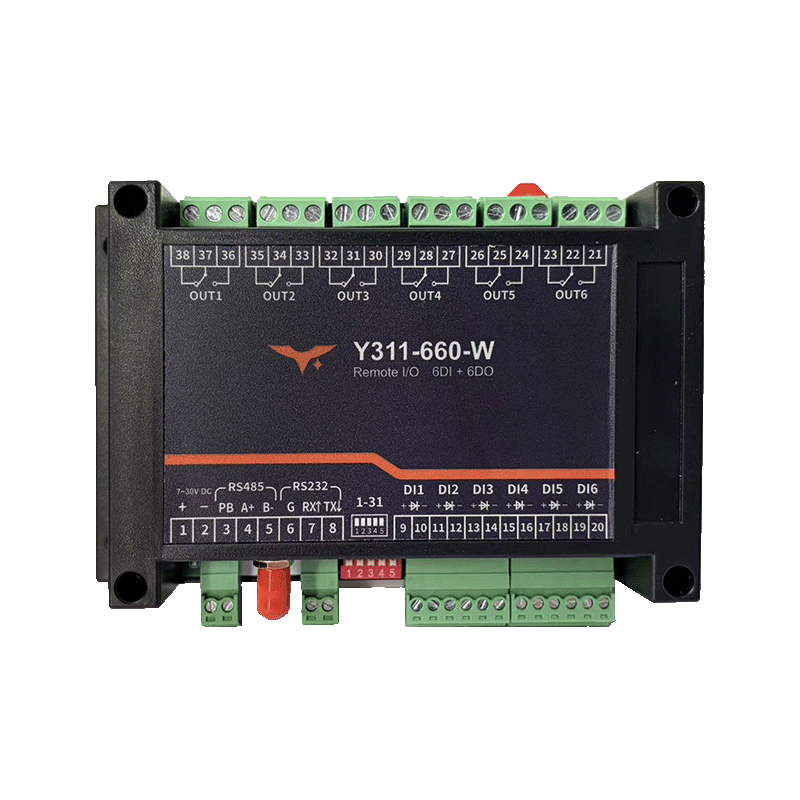
| Y311-660-W | Y311-660-R |
|---|
Reference: Y311-440/660/880-W/R Technical Manual
Contents
- Overview
- Ordering Information
- Key Features
- Technical Specifications
- Interfaces and Pin Definition
- Mechanical and Environmental
- Installation and Wiring
- Important Notes
1. Overview
Y311-660 is a 6DI + 6DO remote I/O module available in two network variants.
| Model | DI | DO | Connectivity | Typical Applications |
|---|---|---|---|---|
| Y311-660-W | 6 | 6 | 2.4 GHz Wi-Fi, AP/STA | Remote pumps and valves, lighting control, power status feedback |
| Y311-660-R | 6 | 6 | 10/100M RJ45 Ethernet | Remote pumps and valves, lighting control, power status feedback |
Both models share the same I/O specification and control logic. The only major difference is the network interface.
2. Ordering Information
2.1 Model Naming
text
Y311 - 6 6 0 - W / R
W: Wi-Fi
R: RJ45 Ethernet
2.2 SKU and Network Capability
| SKU | Description | Connectivity | Power |
|---|---|---|---|
| Y311-660-W | 6DI + 6DO, Wi-Fi remote I/O module | 2.4 GHz Wi-Fi AP/STA | 7 to 40 VDC |
| Y311-660-R | 6DI + 6DO, Ethernet remote I/O module | 10/100M RJ45 Ethernet | 7 to 40 VDC |
3. Key Features
6DI + 6DOCapacity: Built for medium-point remote monitoring and control.- Wi-Fi or Ethernet Networking: Same I/O hardware with wireless or wired access options.
- Modbus TCP Ready: Easy to connect to upper computers, gateways, and SCADA systems.
- Wide
7 to 40 VDCInput: Suitable for common industrial control cabinets. - Local Control Logic: Supports flash-on, flash-off, and basic interlock actions.
4. Technical Specifications
| Parameter | Y311-660-W | Y311-660-R |
|---|---|---|
| Network Interface | 2.4 GHz Wi-Fi | 1 x RJ45, 10/100 Mbps |
| Default Management IP | 192.168.16.254 | 192.168.1.7 |
| Default Port | 60000 (AP) / 10000 (TCP) | 10000 |
| Baud Rate | 2400 / 4800 / 9600 / 19200 / 38400 bps | Same as left |
| Device Address | 0 to 255 | 0 to 255 |
| DI | 6 x dry or wet contact | Same as left |
| DO | 6 x 10 A relay | Same as left |
| Power Input | 7 to 40 VDC | Same as left |
5. Interfaces and Pin Definition
| Interface | Y311-660-W | Y311-660-R |
|---|---|---|
| Wi-Fi Antenna | Standard | Not available |
| RJ45 | Not available | Standard |
COM+ / COM- / DI1 to DI6 | Standard | Standard |
CH1 to CH6 relay terminals | Standard | Standard |
DIP / RESET | Standard | Standard |
6. Mechanical and Environmental
| Parameter | Specification |
|---|---|
| Dimensions | 145 x 94 x 41 mm |
| Operating Temperature | -40 to 85 C |
| Mounting | DIN rail or panel mounting |
7. Installation and Wiring
- Connect the power supply.
- For
-W, configure Wi-Fi. For-R, connect the RJ45 Ethernet cable. - Wire the DI and DO terminals.
- Follow the technical manual to configure the device address and verify the register mapping.
8. Important Notes
Y311-660-WandY311-660-Rare two separate models.- The old
WRwording in legacy documents only means a combinedW/Rdescription and is no longer used as an actual model name.
- Manufacturer: Hunan YenGear Tech Co., Ltd.
- Address: Room 21014, Building 1, Fudi Xingguang Tiandi, Yingxin Road, Yuhua District, Changsha, Hunan, China
- Email: hi@yengear.com
- Website: www.yengear.com