
Appearance
Y201-W Mini Wi-Fi DTU Specification
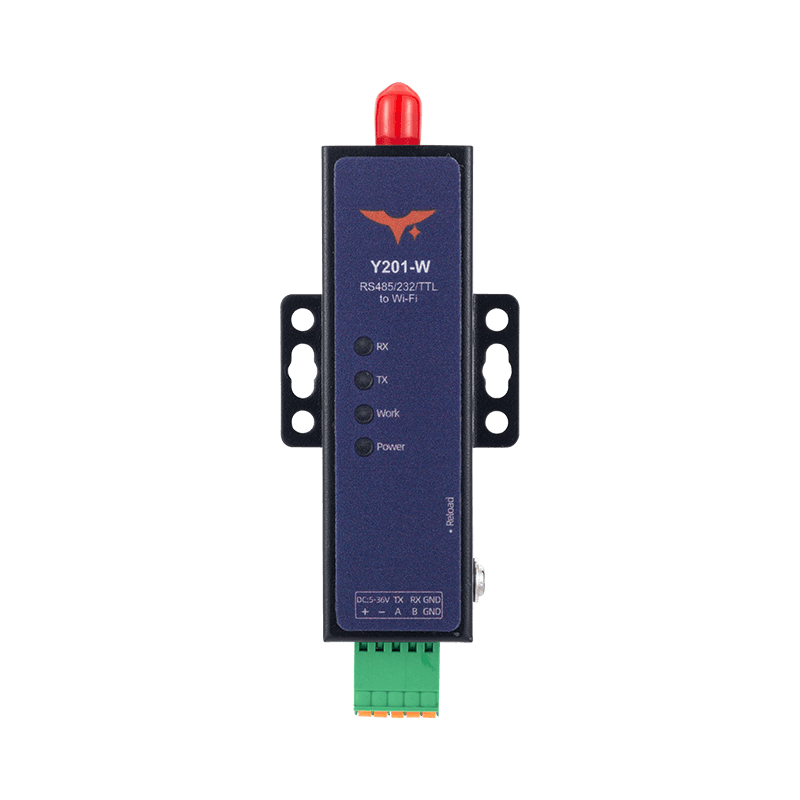
Reference: Y201-W Technical Manual
Contents
- Overview
- Ordering Information
- Key Features
- Technical Specifications
- Interfaces and Indicators
- Installation and Access
- Application Notes
1. Overview
Y201-W is the Wi-Fi model in the Y201 mini DTU family. It provides dual-serial to Wi-Fi data bridging and uses a 240 MHz 32-bit RISC-V processor with 5 to 36 VDC wide-range power input. Each serial port can be configured independently with dual Socket links, making it suitable for industrial data collection, building control, remote maintenance, and wireless networking.
The device supports AP, STA, and AP+STA wireless modes, along with TCP, UDP, HTTP, and MQTT. It also supports Modbus TCP to Modbus RTU conversion and can be configured through the built-in Web UI or AT commands.
| Item | Description |
|---|---|
| Positioning | Dual-serial to Wi-Fi industrial DTU |
| Processor | 32-bit RISC-V, up to 240 MHz |
| Serial Ports | 2 ports, RS485 or RS232 depending on model |
| Wireless Modes | AP / STA / AP+STA |
| Power Input | 5 to 36 VDC |
| Configuration | Web UI, serial AT, network AT |
Highlights
- Dual serial ports with dual Socket channels per port for multi-center data paths
- Supports 2.4 GHz and 5 GHz operation with Wi-Fi 6 compatibility
- Built-in Modbus RTU to Modbus TCP gateway for SCADA integration
- Registration packets, heartbeat packets, auto reconnect, and fault self-recovery
- Supports Web-based upgrade and HTTP remote upgrade
2. Ordering Information
2.1 Model Naming
Y201-W-XX
W: Wi-Fi uplinkXX: Serial interface type,232or485
2.2 SKU List
| SKU | Serial Interface | Typical Application |
|---|---|---|
| Y201-W-232 | Dual RS232 | Serial networking and control cabinet retrofit |
| Y201-W-485 | Dual RS485 | Industrial bus and instrumentation systems |
2.3 Standard Package
1 x Y201-W device, electronic documentation, warranty information.
Optional accessories: SMA antenna, serial cable harness, power adapter, DIN mounting accessories.
3. Key Features
- Dual Serial, Dual Links: Two serial ports, each with Socket A and B for parallel communication paths.
- Broad Protocol Support: Supports TCP client/server, UDP client/server, HTTP client, and MQTT.
- Flexible Wireless Networking: Supports AP, STA, and AP+STA; AP mode can serve
1 to 8terminals. - Modbus Gateway: Supports Modbus TCP to Modbus RTU conversion.
- Enhanced Data Handling: Supports packetization by length or interval, plus registration and heartbeat packets.
- Comprehensive Maintenance: Supports LAN discovery, network AT, serial upgrade, and network upgrade.
- Automatic Recovery: Supports reboot on network inactivity timeout for unattended deployments.
4. Technical Specifications
4.1 Electrical and Environmental
| Parameter | Specification |
|---|---|
| Dimensions | 74 x 27 x 15.6 mm, excluding tabs and terminal |
| Operating Temperature | -40 to 85 C |
| Operating Humidity | 5 to 95% RH, non-condensing |
| Power Connector | 2.54 x 7P terminal |
| Supply Voltage | 5 to 36 VDC |
| Current Consumption | 55 mA @ 12 V |
4.2 Wireless Specifications
| Parameter | Specification |
|---|---|
| Standard | Compatible with 802.11ax / 802.11ac and fully backward-compatible with 802.11b/g/n |
| Mode | AP, 1 to 8 STA / STA / AP+STA |
| TX Power | 20.5 dBm max |
| Antenna Interface | SMA connector, external thread and female center |
| Security | WPA-PSK / WPA2-PSK / WPA3-PSK |
4.3 Serial Specifications, 2 Ports
| Parameter | Specification |
|---|---|
| Interface Type | 2.54 terminal, RS232 or RS485 |
| Baud Rate | 1200 to 460800 bps, default 115200 |
| Parity | NONE / ODD / EVEN, default NONE |
| Data Bits | 7 / 8, default 8 |
| Stop Bits | 1 / 2, default 1 |
| Hardware Flow Control | Not supported |
4.4 Network and Protocol Capability
| Item | Specification |
|---|---|
| Network Protocols | DHCP / DNS / TCP / UDP / HTTP / ICMP / MQTT |
| TCP Server Concurrency | Up to 8 clients per port |
| Socket Modes | Socket A / B per serial port; only port 1 Socket A enabled by default |
| Packet Length | 8 to 1460 bytes, default 1460 |
| Packet Interval | 0 to 1000 ms, 0 = adaptive |
4.5 Software and Maintenance
| Item | Description |
|---|---|
| Built-In Web UI | Parameter setting, status display, firmware upgrade |
| AT Commands | Serial AT and network AT |
| LAN Discovery | Default UDP port 8168, keyword HuayunIOT |
| Firmware Upgrade | Web upgrade and HTTP download upgrade |
5. Interfaces and Indicators
5.1 LEDs
| LED | Meaning |
|---|---|
| Power | Power indicator |
| Work | Slow blink: Wi-Fi connected; fast blink: Wi-Fi disconnected |
| TX1 / RX1 | Port 1 transmit / receive activity |
| TX2 / RX2 | Port 2 transmit / receive activity |
5.2 Button
| Button | Function |
|---|---|
| Reset | Press and hold for more than 3 s to restore default parameters |
6. Installation and Access
6.1 Quick Access
- Connect the device to the field controller with the serial cable.
- Power on the device.
- Search for and connect to the default hotspot
HY-W202. - Open
192.168.4.1in a browser. - Log in with
admin/admin. - Configure Socket parameters on the Port page and reboot the device.
6.2 Debug Example, TCP Server
Following the vendor example, set Socket A on Port 1 to TCP server with port 6666. After reboot, use a TCP client to connect to 192.168.4.1:6666 for transparent transmission testing.
6.3 Mechanical Dimensions
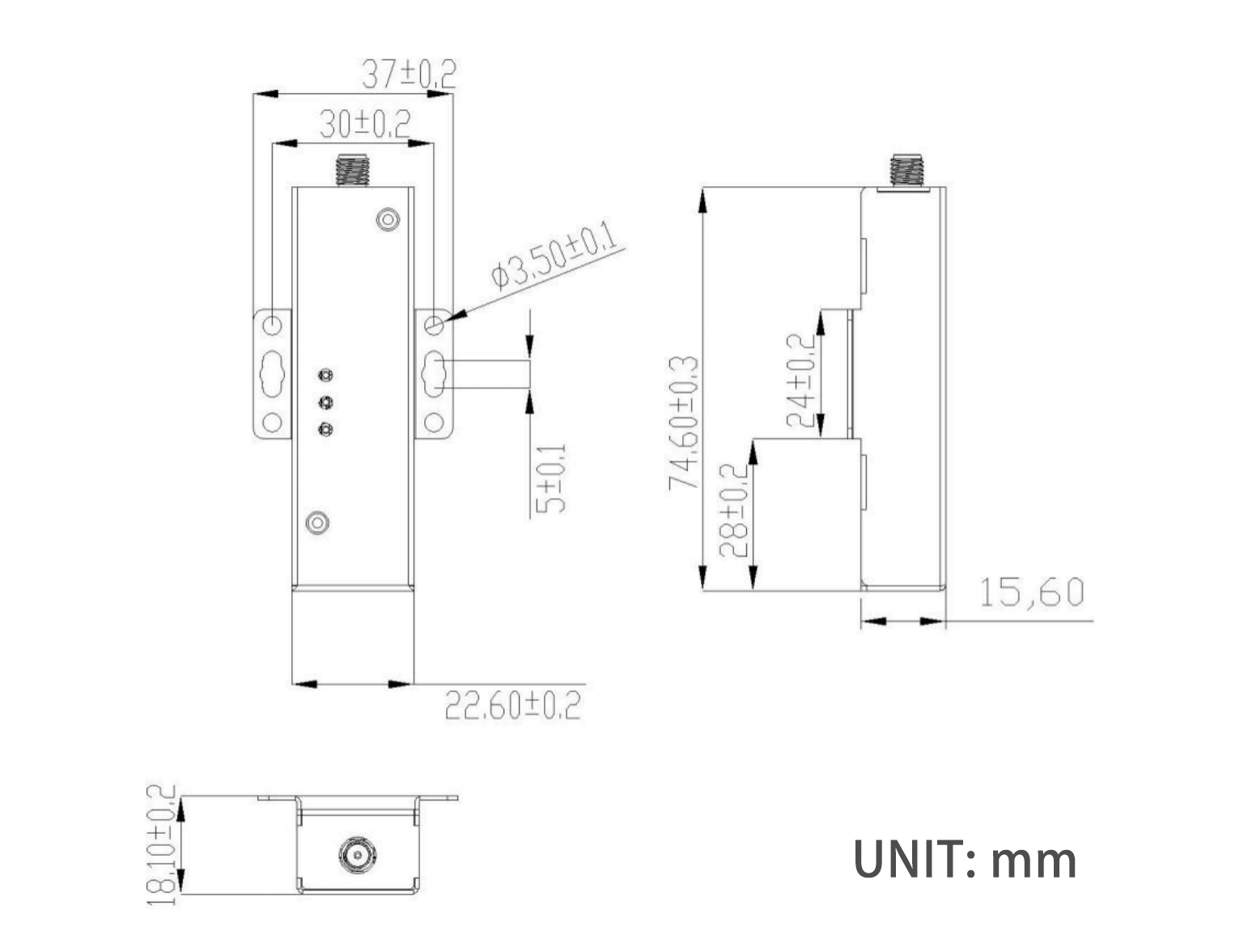
This dimension drawing applies to the Y201 mini enclosure and can be used as an installation reference for the Y201-W.
7. Application Notes
- Wireless serial bridging: Bring traditional serial devices onto WLAN without additional Ethernet cabling.
- Point-to-point communication: Supports AP and STA combinations for point-to-point wireless transmission.
- Modbus retrofit: Use gateway mode for Modbus RTU to Modbus TCP conversion.
- Cloud connectivity: Supports MQTT and HTTP client uplink, including Alibaba Cloud mode.
- Remote maintenance: Supports network AT, LAN discovery, and HTTP upgrade for remote service.
For detailed parameter settings and AT commands, see the Y201-W Technical Manual.
- Manufacturer: Hunan YenGear Tech Co., Ltd.
- Address: Room 21014, Building 1, Fudi Xingguang Tiandi, Yingxin Road, Yuhua District, Changsha, Hunan, China
- Email: hi@yengear.com
- Website: www.yengear.com