
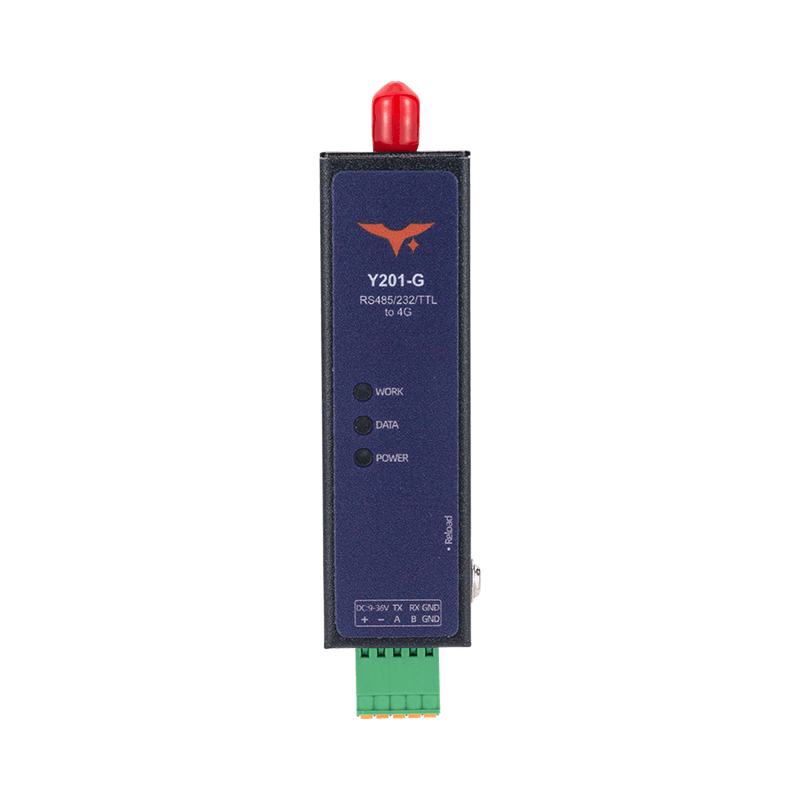
Appearance
Y201-G Technical Manual
Contents
- Overview
- Default Parameters
- Serial Modes and Packetization
- Data Transfer and Sockets
- AT Command Conventions
- AT Command Quick Reference
- Modbus Polling and JSON Reporting
- Maintenance, Upgrade, and Exception Handling
- Troubleshooting
1. Overview
Y201-G, corresponding to the vendor model EP-D200, is used for remote communication between serial devices and a 4G Cat.1 network. It supports TCP, UDP, HTTP, MQTT, peer-to-peer transmission, SMS transparent transmission, serial or network or SMS AT commands, and Modbus polling with JSON reporting.
| Item | Description |
|---|---|
| Uplink | 4G Cat.1 |
| Serial Interface | RS232 / RS485 / TTL, depending on SKU |
| Socket Channels | Multi-channel support per serial port, Socket A enabled by default |
| Maintenance Methods | Config tool, serial AT, network AT, SMS AT |
2. Default Parameters
The following defaults come from the vendor AT command and function documentation.
| Parameter | Default |
|---|---|
| Serial Baud Rate | 115200 |
| Data Bits / Stop Bits / Parity | 8 / 1 / NONE |
Packet Interval UARTTLn.tm | 5 ms |
Packet Length UARTTLn.len | 1024 |
| Socket Enable | Only serial port 1, Socket A enabled by default |
Offline Cache CACHEn | ON |
Registration Packet REGMDn | OFF |
Heartbeat Mode HEARTMDn | OFF |
Heartbeat Interval HEARTTMn | 60 s |
Extended AT EXAT | ALL, NAT@ |
Reboot on No Downlink Data SOCKRTO | 1440 min |
Remote Device Management RDM | OFF |
3. Serial Modes and Packetization
3.1 Serial Working Modes
- Transparent Mode, default: Serial data is forwarded to the network
- AT Mode: Serial input is executed as AT commands and network downlink data is discarded
3.2 Entering AT Mode
Recommended sequence:
- Send
+++ - Wait,
500 msrecommended and less than3 s - Send
a - Enter AT mode after receiving
+ok
Notes:
- After receiving
+++, the device pauses network data output for up to about3 s - AT mode is not saved across power cycles; the device returns to transparent mode after reboot
Exit AT mode with AT+EXIT or reboot the device.
3.3 Packetization, AT+UARTTLn
Transmission is triggered when either condition is met:
- Length trigger:
len >= packet length, range64 to 1024 - Interval trigger: inter-character gap
>= packet interval, range1 to 300 ms
Example:
text
AT+UARTTL1=30,1024
AT+REBOOT
4. Data Transfer and Sockets
4.1 Protocol Types
In the vendor AT command set, SOCKns.type supports:
TCPC: TCP clientUDPC: UDP clientHTPC: HTTP client, only onSOCKnAEDP: Peer-to-peer transmission, only onSOCKnASMS: SMS transparent transmission, only onSOCKnAMQTT: MQTT, only onSOCKnAHYTCP/HYMB: Cloud service forwarding, only onSOCKnA
4.2 Typical Configuration Flow, TCP Example
text
AT+SOCKEN1A=ON
AT+SOCK1A=TCPC,test.huayuniot.com,8168
AT+REBOOT
4.3 HTTP Example, POST
text
AT+SOCK1A=HTPC,www.rt-thread.com,80
AT+HTPURL1=/service/echo
AT+HTPHD1=Connection:keep-alive
AT+HTPREQ1=POST
AT+REBOOT
5. AT Command Conventions
5.1 Format Rules
- Commands start with
AT+and end with\ror\n - Commands are case-insensitive, uppercase is recommended
- Maximum command length is
256 bytes - Multiple parameters are separated by commas
- Wait for the previous command response before sending the next one, maximum timeout about
12 s - In command names,
nrepresents the serial port number such as1or2, andsrepresents the Socket channelA/B
Call forms:
- Query:
AT+CMDorAT+CMD? - Set:
AT+CMD=v1,v2,... - Help:
AT+CMD=?
5.2 Error Codes
| Error Code | Meaning |
|---|---|
ARGS | Invalid parameter |
ARGC | Wrong number of parameters |
CMD_UNKNOWN | Unknown command |
CMD_FORMAT | Invalid format |
CMD_LENGTH | Command too long |
DEV_MEMORY | Memory error |
DEV_SAVE | Save failed |
6. AT Command Quick Reference
6.1 Basic Control and Status
| Command | Function | Notes |
|---|---|---|
AT+LIST | Command list | Preferred for debugging |
AT+EXIT | Exit AT mode | Returns to transparent mode |
AT+REBOOT | Reboot device | Applies parameters |
AT+RSTCFG | Restore backup parameters | Equivalent to Reload |
AT+BKCFG | Back up current parameters | Recommended after configuration |
AT+CLRCFG | Restore factory parameters | Full factory reset |
AT+DEVINFO | Device information | MODULE / VERSION / IMEI / SN and more |
AT+SOCKLK | Query TCP client status | Returns OFF for UDP or TCP server |
AT+CSQ | Signal strength | 0 / 1 / 2 to 30 / 31 / 99 |
AT+CEREG | Network registration status | 0 not registered, 1 registered |
AT+CGATT | Data network attach status | 0 detached, 1 attached |
AT+IP | Query IPv4 address | Current network address |
AT+IMEI | Query IMEI | 15 digits |
AT+ICCID | Query ICCID | Usually 20 digits |
AT+IMSI | Query IMSI | Usually 15 digits |
AT+PING=addr | Ping | Returns latency or error reason |
6.2 Serial, APN, and Socket
| Command | Range / Default |
|---|---|
AT+UARTn=<baud>,<data>,<stop>,<parity>,<fc> | baud 2400 to 460800, default 115200; data 7/8; stop 1/2; parity NONE/EVEN/ODD; fc NFC/485, default 485 |
AT+UARTTLn=<tm>,<len> | tm 1 to 300 ms, default 5; len 64 to 1024, default 1024 |
AT+CACHEn=<state> | ON, default / OFF |
AT+APN=<state>,<apn>,<user>,<pass>,<auth> | state: 0 default APN, default / 1 custom; auth: 0 NONE / 1 PAP / 2 CHAP |
AT+SOCKENns=<state> | ON / OFF, only 1A enabled by default |
AT+SOCKns=<type>,<addr>,<port> | type see Section 4; addr up to 64 bytes; port depends on protocol |
6.3 HTTP and MQTT
| Command | Range / Default |
|---|---|
AT+HTPURLn=<url> | URL 1 to 64 bytes, valid for POST |
AT+HTPHDn=<hd> | Header 1 to 64 bytes, use ` |
AT+HTPFTn=<state> | ON, default and filters HTTP header / OFF |
AT+HTPREQn=<request> | GET / POST / AUTO |
AT+HTPTOn=<to> | 1 to 30 s, default 6 |
AT+MQCONFn=<ver>,<clean>,<keepalive> | ver 3/4, default 4; clean 0/1, default 1; keepalive 30 to 65535 s |
AT+MQAUTHn=<id>,<user>,<pass> | ID 1 to 64; user 1 to 64; pass 1 to 128 |
AT+MQSUBn=<enable>,<topic>,<qos> | enable 1, default / 0; topic 1 to 64; qos 0/1/2 |
AT+MQPUBn=<enable>,<topic>,<qos>,<retain> | Publish enabled by default; qos default 0; retain default 0 |
AT+MQWILLn=<enable>,<topic>,<qos>,<msg>,<retain> | Last will configuration |
AT+MQMDn=<mode> | STD, default / ALI |
6.4 SMS, Registration Packet, Heartbeat, and Transparent AT
| Command | Range / Default |
|---|---|
AT+SMSS=<num>,<msg> | Send SMS; msg does not support CR or LF |
AT+REGTPn=<type> | IMEI / ICCID / USER |
AT+REGMDn=<mode> | OFF, default / FIRST / EVERY / ALL |
AT+REGDATn=<data>,<fmt> | fmt: HEX, up to 64 bytes / ASCII, up to 32 bytes |
AT+HEARTMDn=<mode> | OFF, default / UART / NET |
AT+HEARTTMn=<time> | 1 to 86400 s, default 60 |
AT+HEARTDATn=<data>,<fmt> | fmt: HEX / ASCII |
AT+EXAT=<mode>,<key> | mode: OFF / NET / UART / ALL, default ALL; default key NAT@ |
AT+SOCKRTO=<time> | 0 to 4320 min, default 1440; 0 disables the function |
AT+DOWNLOAD=<uri> | HTTP download upgrade, returns OK or +ERROR:FAIL |
AT+DTCVTn=<up>,<down> | Data conversion: RAW / BTS / STB; up is serial-to-network and down is network-to-serial |
7. Modbus Polling and JSON Reporting
The vendor AT documentation provides a full command family:
AT+MODBUSn: Modbus TCP / RTU gateway enableAT+MBCFGn: Polling enable, interval, and periodAT+MBCMDn: Polling command, HEX format, multiple commands separated with|AT+MBJSn: Combined Modbus and serial transparent reporting modeAT+HJREG: Register point table configuration for JSONAT+JSERRn: Control whether failed reads are reported asnullAT+JSUDn,AT+JSTMn,AT+JSIMEIn,AT+JSICCIDn,AT+JSIOn,AT+JSGPSn: Additional JSON fields
Key ranges from the vendor documentation:
MBCFGn.tv:100 to 35535 msMBCFGn.period:1 to 2592000 sMBJSn.mode:OFF / POLL / ALL
8. Maintenance, Upgrade, and Exception Handling
8.1 Upgrade
- Local USB upgrade, driver required
- HTTP upgrade through
AT+DOWNLOAD=host:port/path.bin
8.2 Parameter Partitions
- Parameter Area: Current runtime parameters
- Backup Area: Saved with
AT+BKCFG, restored withAT+RSTCFG - Factory Area: Restored with
AT+CLRCFG
Recommended flow:
- Configure parameters.
- Run
AT+BKCFG. - Use
AT+RSTCFGwhen rollback is required.
8.3 Exception Self-Recovery
AT+SOCKRTO=<time>controls automatic reboot on no downlink data- Default value is
24 hours, suitable for unattended deployments
9. Troubleshooting
| Symptom | Check Steps |
|---|---|
| Cannot register to the network | Check AT+CSQ, AT+CEREG, AT+CGATT, SIM status, and antenna status |
| Network is up but server is not connected | Check SOCKEN and SOCK parameters and use AT+SOCKLK to view connection status |
| Serial data is abnormal | Verify AT+UARTn settings match the field device and check UARTTLn packetization parameters |
| HTTP or MQTT fails | Check HTP* or MQ* parameters one by one and verify basic TCP transparent transmission first |
| Registration packet or heartbeat is invalid | Check whether REG* or HEART* is enabled and whether the mode matches the application |
| Frequent reboot | Check whether AT+SOCKRTO is set too short |
| Remote transparent AT does not work | Check AT+EXAT mode and key, default ALL,NAT@ |
- Manufacturer: Hunan YenGear Tech Co., Ltd.
- Address: Room 21014, Building 1, Fudi Xingguang Tiandi, Yingxin Road, Yuhua District, Changsha, Hunan, China
- Email: hi@yengear.com
- Website: www.yengear.com