
Appearance
Y202-W Standard WiFi DTU Specification
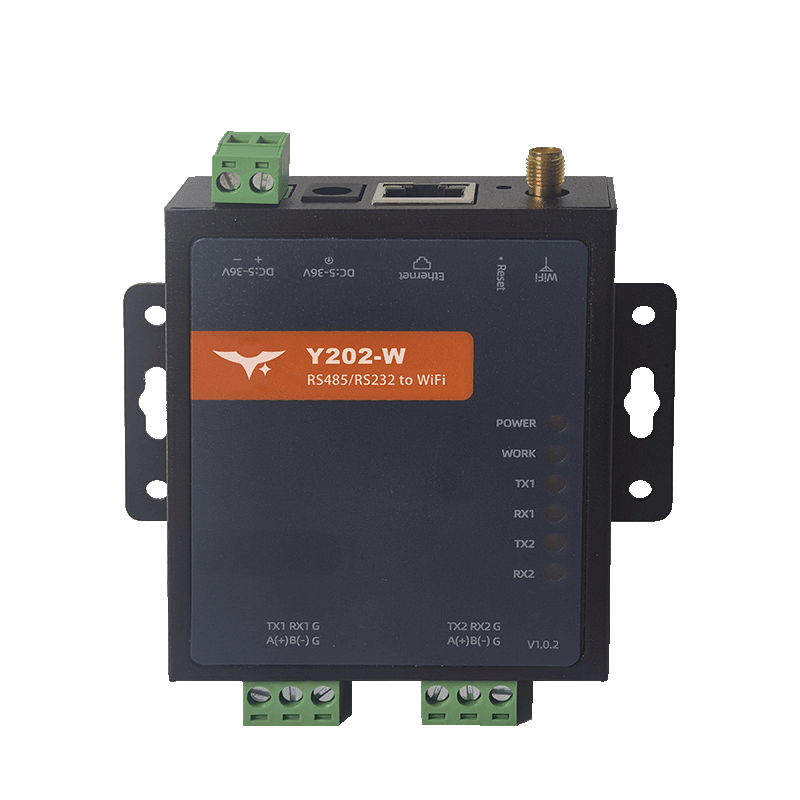
Reference Manual: Y202-W Technical Manual
Document Control
| Item | Detail |
|---|---|
| Version | V1.0.0 |
| Release Date | December 2025 |
| Product Category | Standard WiFi DTU (2-Port) |
Table of Contents
- Overview
- Ordering Information
- Key Features
- Technical Specifications
- Interfaces & Indicators
- Mechanical & Installation
- Application Notes
1. Overview
Y202-W is the WiFi-enabled sibling of the Yanji Y202 series. It bridges two independent serial channels to WiFi or Ethernet uplinks with transparent TCP/UDP/HTTP/MQTT sockets, Modbus RTU ↔ TCP gateway, JSON uploader, AT automation, and comprehensive watchdog protection. A 5–36 V DC input, dual-core 240 MHz MCU, and compact DIN-ready shell make it ideal for retrofitting cabinets where cabling space is limited but dual serial access is mandatory.
| Item | Description |
|---|---|
| MCU & Firmware | Dual-core 240 MHz MCU, RTOS, dual watchdog |
| Serial Ports | 2 × RS232/RS485 (per-port selectable) |
| Wireless | 802.11 b/g/n 2.4 GHz, AP / STA / AP+STA |
| Ethernet | 10/100Base‑T RJ45 (auto MDI/MDIX) |
| Power | 5–36 V DC via 2-pin terminal or DC jack |
Positioning Highlights
- Dual serial channels with dual sockets each, enabling simultaneous SCADA + cloud connectivity.
- WiFi uplink modes (AP/STA/AP+STA) cover greenfield deployments, retrofits, and maintenance hotspots.
- Integrated Modbus gateway, HTTP client, MQTT publisher, registration packets, and heartbeats.
- Mini enclosure (84 × 70 × 25 mm) plus DB9 + pluggable terminal wiring for fast drop-in replacements.
2. Ordering Information
2.1 Model Naming
Y202-W-XX
- Y202 – Dual-port DTU platform.
- W – WiFi + Ethernet uplink.
- XX – Serial configuration (2H = dual RS232, 4H = dual RS485, 6H = mixed).
2.2 SKU Matrix
| SKU | Serial Configuration | Notes |
|---|---|---|
| Y202-W-2H | 2 × RS232 (DB9 + terminal) | Legacy PLC/HMI upgrades |
| Y202-W-4H | 2 × RS485 | Multi-drop metering, protection relays |
| Y202-W-6H | 1 × RS232 + 1 × RS485 | Mixed engineering + field bus |
2.3 Standard Package
1 × Y202-W DTU
1 × DB9 male breakout (COM1)
1 × 3-pin pluggable terminal (COM2/power)
1 × WiFi SMA antenna
DIN-rail clip, quick-start card, warranty
Optional: 12 V adapter, USB console cable.
3. Key Features
- WiFi + Ethernet Flexibility – Switch between WiFi AP, STA, AP+STA, or wired Ethernet via AT commands or web UI; both paths share the same transparent socket stack.
- Dual Sockets per Port – Eight concurrent streams (2 COM × Socket A/B) serve SCADA, maintenance, and analytics simultaneously.
- Rich Protocol Suite – TCP/UDP, HTTP GET/POST/AUTO, MQTT (Aliyun/Baidu/OneNET presets), Modbus RTU ↔ TCP gateway, JSON uploader, and peer-to-peer tunneling.
- Industrial Design – 5–36 V DC input with reverse protection, EFT/ESD hardening, Reload button, and dual watchdog resets.
- Zero-Tool Commissioning – Built-in web UI (default AP
HY-W502,192.168.4.1, admin/admin), LAN discovery utility, and micro-USB console. - Remote Lifecycle Support – HTTP OTA, parameter backup/restore, remote AT, and programmable no-data reboot.
4. Technical Specifications
4.1 Electrical & Environmental
| Parameter | Specification |
|---|---|
| Supply Voltage | 5–36 V DC (terminal or Ø5.0 mm DC jack) |
| Typical Current | 55 mA @ 12 V (WiFi idle) |
| Operating Temp | -40 °C ~ +85 °C |
| Humidity | 5% ~ 95% RH, non-condensing |
| Protection | Reverse polarity, surge clamp, dual watchdog |
| MTBF | >200,000 h (calculated) |
4.2 Serial Interfaces
| Parameter | Specification |
|---|---|
| Ports | COM1 (DB9 male), COM2 (3-pin terminal) |
| Mode | RS232/RS485 selectable per port |
| Baud Rate | 2,400–460,800 bps |
| Data Bits | 7/8 |
| Stop Bits | 1/2 |
| Parity | NONE/EVEN/ODD |
| Flow Control | NFC or RS485 auto-direction |
| Packaging | Length 64–1024 bytes, gap 0–300 ms (adaptive default) |
4.3 Wireless & Ethernet
| Item | Specification |
|---|---|
| WiFi Standard | IEEE 802.11 b/g/n @ 2.4 GHz, 150 Mbps PHY |
| Modes | AP (1–6 STA), STA, AP+STA |
| TX Power | 20.5 dBm max |
| Security | WPA/WPA2/WPA3-PSK |
| Antenna | SMA female (external whip) |
| AP Default IP | 192.168.4.1, DHCP on |
| STA Connection | DHCP/Static via AT or web UI |
| Ethernet | 10/100Base‑T, DHCP/Static, default static 192.168.10.8 |
4.4 Firmware Services
| Service | Details |
|---|---|
| Transparent Data | TCP/UDP client/server, up to 8 TCP clients per server socket |
| HTTP Client | GET/POST/AUTO with custom headers and filtering |
| MQTT Client | Publish/subscribe, QoS 0/1/2, Aliyun/Baidu/OneNET templates |
| Modbus Gateway | RTU ↔ TCP per COM |
| JSON Uploader | Modbus polling + JSON mapping, HTTP/MQTT delivery |
| OTA | HTTP download, local USB/serial upgrade |
5. Interfaces & Indicators
| Group | Description |
|---|---|
| Power | 5.08 mm 2-pin terminal (V+/V-) + Ø5.0 mm DC jack |
| Serial | COM1 DB9 male, COM2 3-pin terminal (A/B/GND or TX/RX/GND) |
| Ethernet | RJ45 10/100 M with LINK/ACT LEDs |
| WiFi | SMA antenna connector |
| USB | Micro-USB console for AT commands/firmware |
| Button | Reload – hold ≥3 s to revert to defaults |
| LEDs | POWER, WORK (WiFi link state), TX1/RX1, TX2/RX2 |
Indicator behavior:
- WORK slow blink = WiFi connected; fast blink = disconnected.
- TX/RX LEDs mirror per-port serial traffic; DATA is multiplexed through TX/RX.
6. Mechanical & Installation
| Item | Value |
|---|---|
| Dimensions | 84 × 70 × 25 mm (body, excl. ears/terminals) |
| Weight | ≈180 g |
| Enclosure | Metal chassis, powder coating, UL94 V-0 liners |
| Mounting | DIN-rail clip (default) or panel ear kit |
Installation recommendations:
- Leave ≥15 mm top/bottom clearance for SMA antenna rotation and airflow.
- Use shielded twisted pairs for RS485 and bond shields at a single point.
- For AP coverage, keep the antenna outside metal enclosures or use an extension pigtail.
- When using AP+STA, ensure the AP cell overlap is ≥65 dB RSSI to avoid roaming drops.
7. Application Notes
- WiFi Retrofits – Deploy Y202-W in cabinets without Ethernet drops; AP mode serves maintenance laptops while STA relays process data to the plant WiFi.
- Redundant Serial Gateway – Use Socket A as TCP Client toward SCADA and Socket B as MQTT to cloud analytics; enable registration packets so servers identify cabinet ID.
- Peer-to-Peer Bridging – Configure EDP tunnels (ID-based) for remote PLC-to-PLC links, while HTTP heartbeats keep the NOC informed.
- Energy Monitoring – Combine Modbus polling + JSON uploader to push aggregated data to HTTP endpoints; enable cache to buffer samples during WiFi outages.
- Manufacturer: Hunan Yanji Tech Co.,Ltd
- Address: Room 21014, Unit 1, Fudixingguang Plaza, Yuhua District Yingxin Road, Changsha, Hunan, P.R. China
- Email: hi@yanjiiot.com
- Website: www.yanjiiot.com